In technicality, there are 2 ways a boss death can work in Wolfenstein 3D.
One way is it drops a key upon death, and the second way is it sets up a deathcam.
But say you want to swap that up for example... (e.g. drop a key instead of showing a deathcam and vice-versa)
This guide will step you through changing this behavior into something you want.
What is needed:
-Borland C++ Compiler 3.1
-Wolfenstein 3D source code
-DOS emulator (or something that is capable of running 16-bit code efficiently)
The files we are changing:
-WL_ACT2.C
-WL_STATE.C
Let's get started!
Open up your code editor of choice and open WL_STATE.C.
Now find the boss you want to edit. Find "case bossobj". It should look a little something like this:
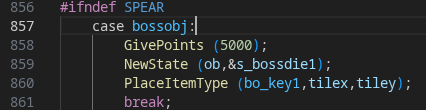
Note the PlaceItemType line at the bottom. We can see it spawns an item type of bo_key1 at its relative position.
Let's look at a boss that spawns a deathcam now.
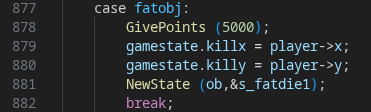
We can now see that there's a gamestate.killx = player->x; or Y. This sets the deathcam position.
So you can implement any of those lines into a boss and they should work... but not yet.
Now let's take a look at WL_ACT2.C.
Find "statetype" and then the statecase which you saw in the boss you were looking at earlier. (Found in the NewState line usually)
Make sure to tab down until you see a bunch of statetype codes.
At the end of the "boss"dies you'll find either NULL or A_StartDeathCam as an action. (mine is A_InstantVictory because i removed the deathcam in AMP)

So you'll want to use NULL if giving an item upon death and use A_StartDeathCam if you want to... use a death cam with the boss.
Make your changes and rebuild your project. The changes should reflect.